Drive Charge Eat app icon EV-tuned road-trip planner for iOS

Drive. Charge. Eat.

Plan every leg of your electric road trip around fast chargers and great food — at real stops with restrooms and people around, never an isolated lot in the dark. Weather-aware battery routing, turn-by-turn navigation, and CarPlay. The break you already have to take, finally working for you — and safe with kids.

iOS 17+ · CarPlay · 100+ languages

  • Stops with food, restrooms & people — not empty lots
  • Weather-aware battery routing
  • Favourite restaurants first
  • Smooth, road-aligned CarPlay navigation
  • Hand off to Waze, ABRP & more
  • Works in 100+ languages
Drive Charge Eat route map with charging stops and food
Live charger ETA
🍴Food in 12 min
The science

Range anxiety isn't a feeling. It's a planning problem.

The two biggest barriers to electric driving — where to charge and how long it takes — are exactly the things a good plan removes. Drive Charge Eat is built on the data.

55%
of hesitant drivers name range anxiety as a reason they haven't gone electric
Source: AAA, 2025
56%
cite too few convenient public chargers
Source: AAA, 2025
60%
of EV drivers eat or grab refreshments while fast-charging
~30 min
average dwell at a restaurant during a charge — a meal, not a wait

The break is already in your trip

A 10–80% fast charge takes about as long as a meal — and 60% of EV drivers already eat or grab refreshments while charging, dwelling around 30 minutes near a restaurant. Drive Charge Eat stacks the stops: the car charges while you eat, and you leave rested with a full battery.

FLO (~40k drivers) · Paren (1M+ sessions, 2025)
Anxiety drops when the plan is explicit

Range anxiety (55%) and too few convenient chargers (56%) are among the top reasons people hesitate to drive electric — and a lack of charging is the single most-cited reason unlikely buyers reject EVs (52%). The fix isn't a bigger battery; it's knowing exactly where you'll charge and how full you'll arrive. The app shows both before you leave.

AAA 2025 · J.D. Power 2024 EVC Study

There's never been more to plug into

Public charging passed 7 million points worldwide at the end of 2025 — up more than 33% in a single year, including over 2 million fast chargers. The hard part isn't whether a charger exists; it's finding the right one, in time. Drive Charge Eat surfaces live fast-charger data along your exact route.

IEA Global EV Outlook 2026
Where you actually stand still

You're stuck there for 20 minutes — make it the right spot

Plenty of chargers sit alone at the back of a dark, empty lot with no one around. Every stop Drive Charge Eat picks is paired with a restaurant instead — lit, busy, with staff and other travellers nearby.

An isolated charger

  • An unlit lot with no one around
  • 20–30 minutes with nowhere to go
  • If something feels wrong, you're on your own

A Drive Charge Eat stop

  • A restaurant, staff and other travellers
  • Lit, busy, easy to leave in a hurry
  • Food and people while you wait
80%
of EV drivers would go out of their way for a charging stop in a safer location
63%
would go out of their way for a charger near a place to eat — the stop we pick by default
Features

Built for the way you actually drive

Every feature exists because we hit the same wall on a real road trip.

Weather-aware battery routing

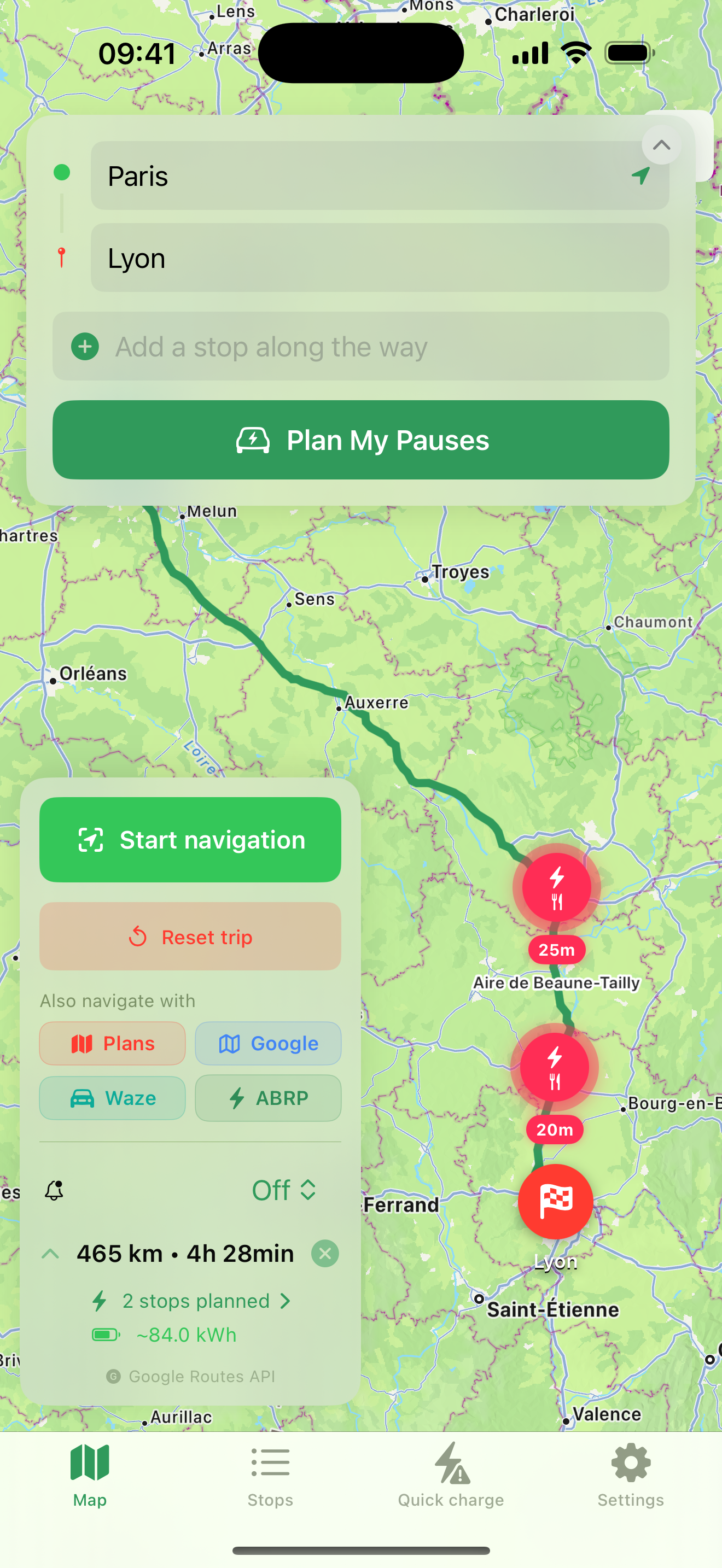
Charging stops placed automatically from your car's real-world range and battery — tuned to ambient temperature, elevation, and terrain, so cold mornings and mountain passes are built into the plan. Charge times follow your car's real charging curve (and its taper above 80%), so the plan tops up just enough to stay fast. Set your own minimum arrival battery, and every stop keeps that safety reserve.

Route from Paris to Lyon with the planned charging stops, total distance, time and energy

Charge where there's food, restrooms — and people

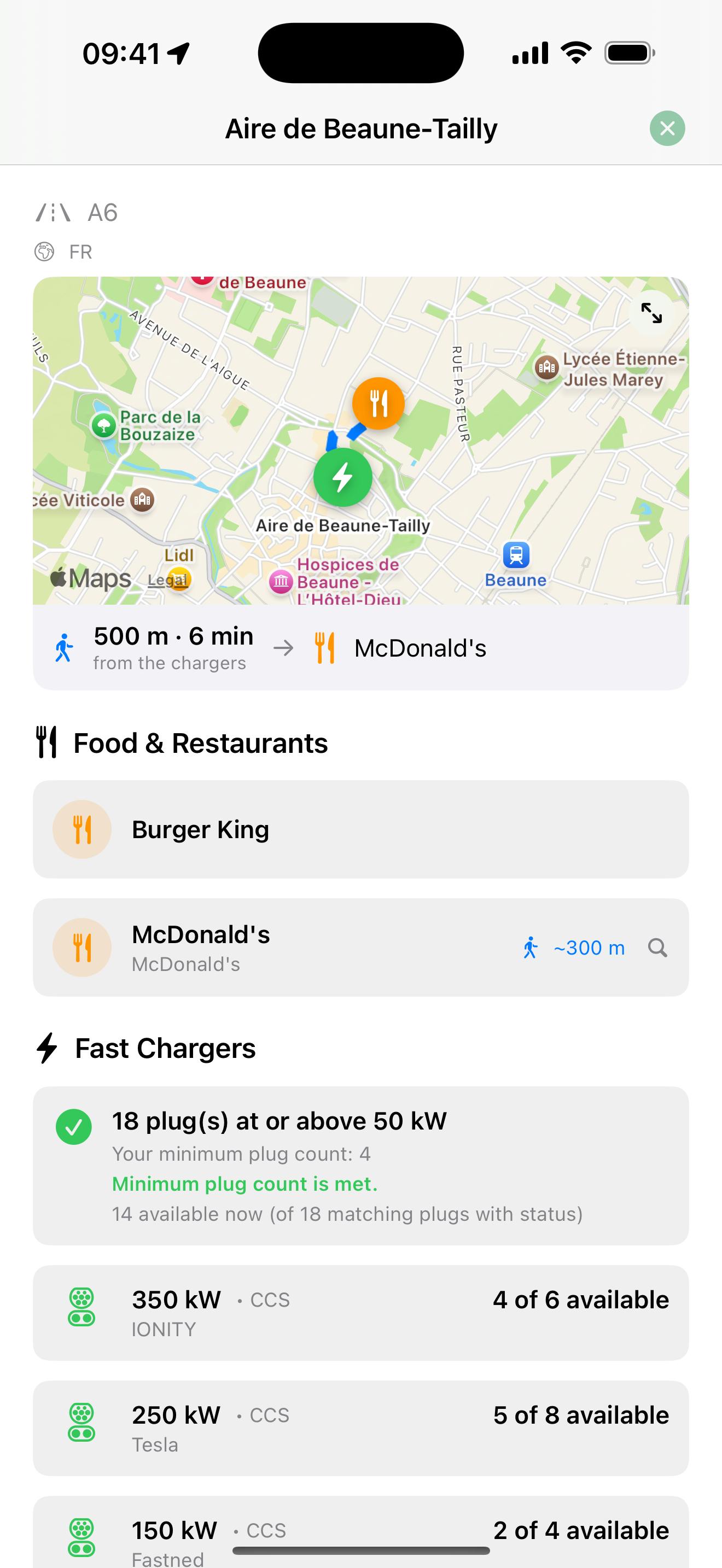
No more stranding yourself at an isolated charger in an empty lot — no food, no toilet, nobody around. Drive Charge Eat routes you to real service areas and restaurants where there are people, restrooms, and a proper meal: somewhere that actually feels safe to stop, which matters most when you're travelling with kids. Your favourite chains come first, stops stay right on your route, and Eat Now finds your favourites open within 30 minutes — each showing how many ≥100 kW fast chargers are right there. Charge while you genuinely rest.

A charging stop showing chargers, power, availability, restrooms, and nearby food

Quick Charge, your way

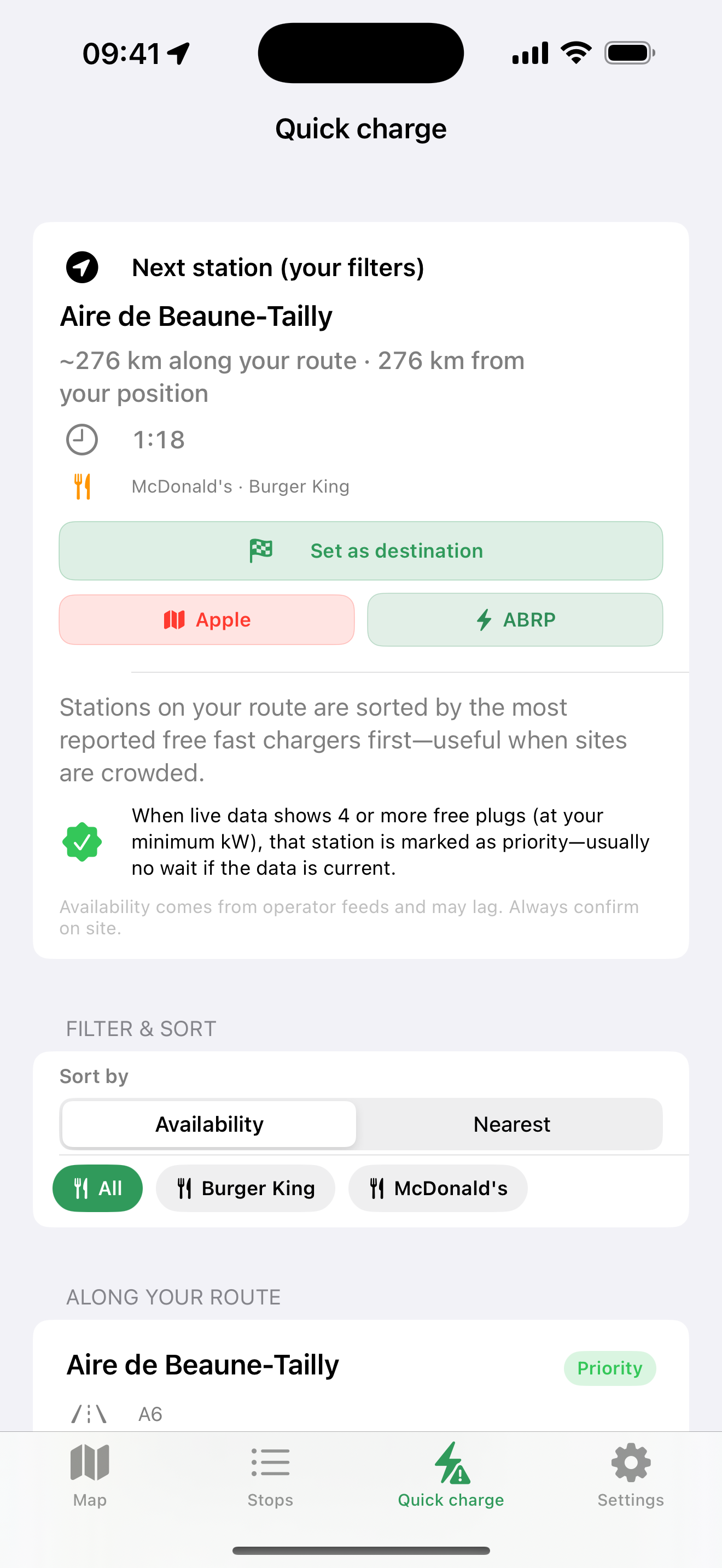
Low or off-plan? Quick Charge ranks fast chargers near you by available power — filter by restaurant brand, see distance and ETA, set any station as your destination, or hand off to Apple Maps, Google Maps, Waze, or A Better Route Planner in one tap.

Quick Charge list of nearby fast chargers ranked by power

Your whole trip on one screen

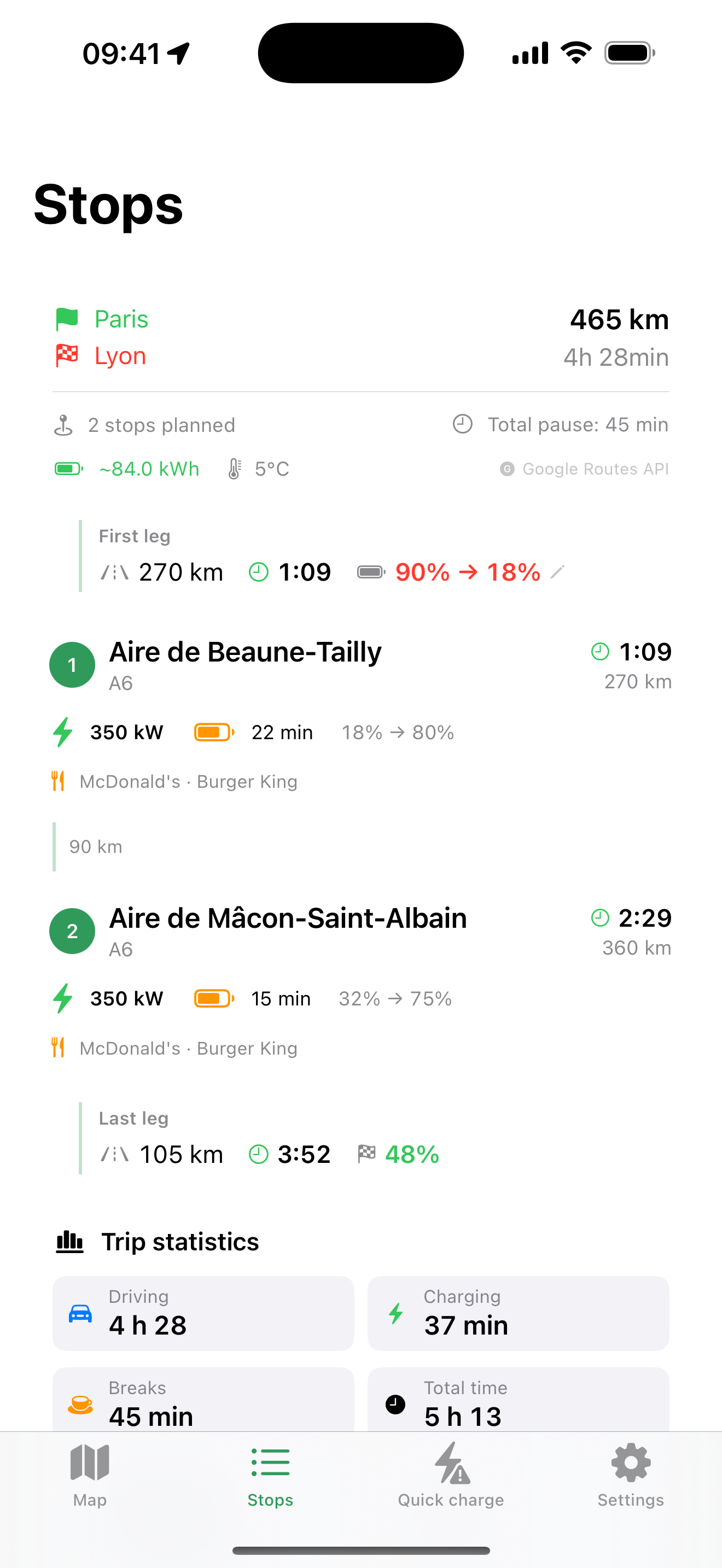
Every charging stop — timed to your battery, with food and a clear arrival time for every leg — laid out before you leave, with the energy and the temperature the plan assumes shown right at the top.

Planned charging stops with power, food, and arrival battery

Turn-by-turn that watches your battery

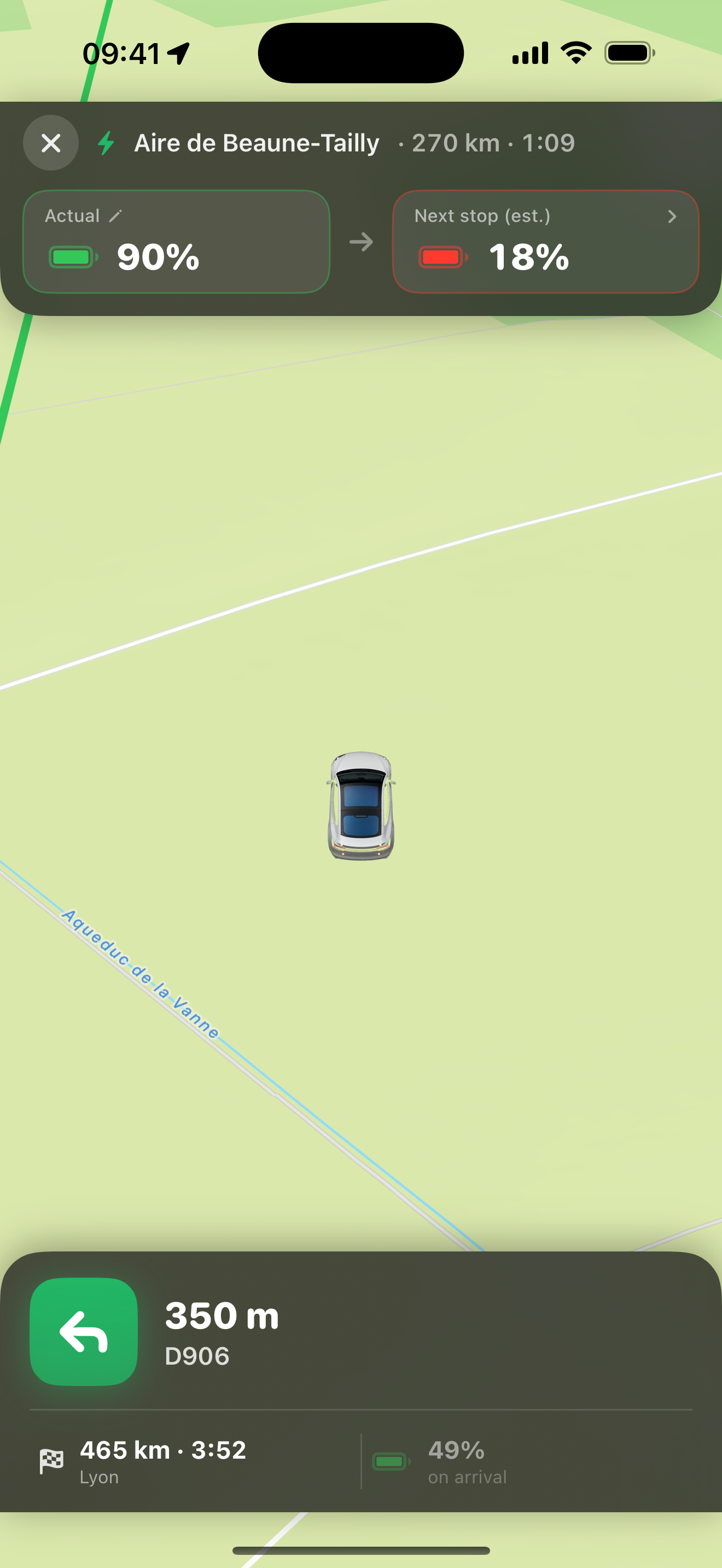
Voice-guided navigation in your phone's language, with the battery you'll have at the next stop and at your destination always on screen. Built for CarPlay — a smooth, fluid map with the car riding low like Waze, aligned to the road through every curve, and colour-coded maneuver signs showing the road and direction. Or hand the whole route off to Apple Maps, Waze, Google Maps, or A Better Route Planner in one tap.

Turn-by-turn navigation with the next maneuver and live battery to the next stop
Screens

See it before you drive

Real screenshots — every screen localized into 100+ languages.

The whole trip on one map

The whole trip on one map

Route, chargers, and the battery you arrive on — at a glance.

Stops that pull double duty

Stops that pull double duty

Charge time and a meal, with realistic arrival times for every leg.

Quick Charge

Quick Charge

Fast chargers near you — filter by restaurant, then navigate or set one as your destination.

Every stop, in detail

Every stop, in detail

Chargers, power, live availability, and the food right next door.

Turn-by-turn, battery-aware

Turn-by-turn, battery-aware

Voice guidance with the battery you'll have at the next stop and your destination — CarPlay-ready.

Watch it drive

Watch it drive

Real CarPlay, recorded in the simulator on real routes — nothing staged. The tour shows what the app does; the country clips show it doing the same thing in each country's own language.

No sound. Tap a video to play it.

Every screen, in one run

Nav · Trip plan · Stops with food · Eat now · Nearby chargers · Battery · Settings · Trip statistics · Recent destinations

Feature tour Los Angeles → San Francisco
  1. Turn-by-turn navigation on the real route, with the next charge and the battery you arrive on
  2. The trip plan: every leg, each charging stop, how long you charge and what you arrive on
  3. Stops with food, and Eat now — your favourites within 30 minutes, with the chargers at each
  4. Nearby chargers, and the battery editor when you set off with less than you expected
  5. Trip statistics: driving time against charging time — and recent destinations, where take-me-home lives

The same drive, in ten languages

Every screen is localized — these were recorded with the phone set to each country's language.

France Paris → Marseille
Germany München → Hamburg
Italy Milano → Roma
Spain Madrid → Barcelona
United States Los Angeles → San Francisco
United Kingdom London → Edinburgh
Netherlands Amsterdam → Paris
Poland Warszawa → Kraków
Sweden Stockholm → Göteborg
Portugal Lisboa → Porto
How it works

From garage to destination in three steps

01

Tell us your EV

Model, real-world range, preferred plug. Takes 30 seconds, never asked again.

02

Pick a destination

We build the route with charging stops that fit your driving style and meal preferences.

03

Drive, charge, eat

Voice guidance and CarPlay take over; we track battery and arrival in the background.

Battery-aware
routing tuned to your EV
Live
fast-charger data
100+
languages
CarPlay
first-class support
Pricing

One subscription. Every road trip.

Unlock the full planner — battery-aware routing, food at every stop, Quick Charge, and CarPlay.

Monthly
$4.99 / month
Billed monthly. Cancel anytime.
  • Battery-aware route planning
  • Food & chargers at every stop
  • Quick Charge near you
  • CarPlay + voice navigation
Download on the App Store

Prices shown in USD; your local price appears in the App Store. No free trial. Subscriptions auto-renew unless cancelled at least 24 hours before the period ends; manage or cancel anytime in Settings.

FAQ

Questions, answered

Will it stop at chargers with food and restrooms?

Yes — that is the whole point of Drive Charge Eat. Drive Charge Eat plans every charging stop at a real place with food, restrooms and people around, putting your favourite restaurants first and hiding anything closed at the time you would arrive. Drive Charge Eat does not route you to an isolated parking lot, so the stops are ones you are comfortable making even with kids in the car.

What is Eat Now?

Eat Now is a feature of Drive Charge Eat that shows, in one tap, your favourite restaurants open within about 30 minutes of where you are. Each result in Eat Now lists the town and how many fast chargers of 100 kW or more are at that location, so you can eat and fast-charge in a single stop.

How much does it cost?

Drive Charge Eat costs $4.99 per month or $39.99 per year as an auto-renewable subscription; your local price is shown in the App Store. One Drive Charge Eat subscription unlocks the entire planner, and there is no free trial.

Which cars are supported?

Drive Charge Eat supports most modern electric cars, including Tesla, Hyundai and Kia, Volkswagen ID, BMW i, Volvo and Polestar, Renault, Peugeot, Citroën, Nissan, Ford Mustang Mach-E, MG and BYD. You set your model once in Drive Charge Eat and the routing then works from that car's real-world range rather than a brochure figure.

Where does the charger data come from?

Drive Charge Eat uses open, worldwide charging data from OpenChargeMap, OpenStreetMap and Apple Maps, with Google as an optional extra source for coverage and live availability. Drive Charge Eat requires no vehicle account and no login to read charger data.

Does it work offline?

Drive Charge Eat works offline for cached maps and the last plan it computed, including a straight-line fallback if you lose signal mid-trip. Live charger availability in Drive Charge Eat needs a connection, because that number comes from a live feed.

Do I have to use your navigation?

No. Drive Charge Eat includes its own turn-by-turn voice navigation with CarPlay, but you can hand any stop or destination off to Apple Maps, Waze or Google Maps whenever you prefer.

What about my privacy?

Drive Charge Eat plans your trips on-device against open data. Drive Charge Eat does not require an account, does not track you across apps, and does not sell your location.

Your next road trip, already solved.

Battery-aware routing and stops with food, restrooms, and people — never an empty lot. Family-friendly, in 100+ languages.

Download on the App Store